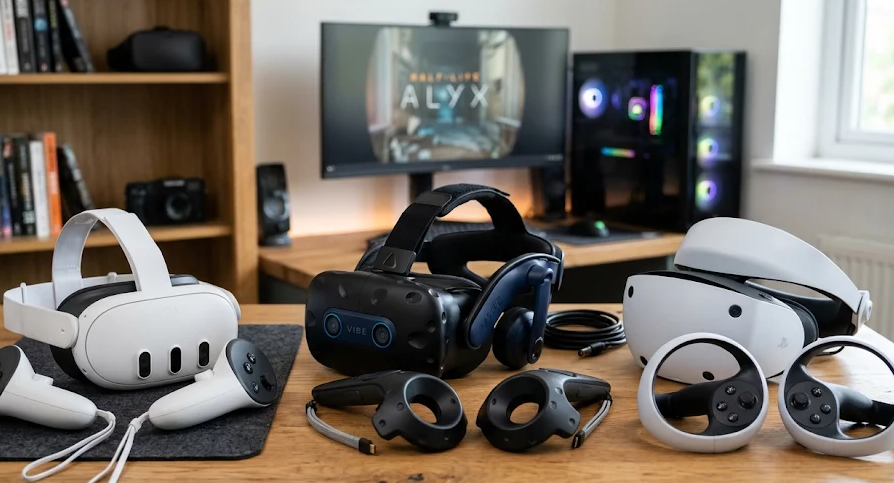
Virtual reality has evolved from an experimental gaming technology into a versatile computing platform. Modern VR headsets allow users to explore virtual environments, play immersive games, attend virtual events, experience interactive education, exercise, and work with digital content in entirely new ways.
They are comparative buying-guide scores, not claims of independent laboratory testing.
| Headset | Performance | Visual Quality | Comfort Potential | Value for Money | Overall |
|---|---|---|---|---|---|
| Meta Quest 3S | 8.5 | 7.8 | 8.0 | 9.5 | 8.5/10 |
| Meta Quest 3 | 9.0 | 9.0 | 8.8 | 9.5 | 9.2/10 |
| PlayStation VR2 | 9.0 | 9.2 | 8.5 | 8.5 | 8.8/10 |
| Pimax Crystal Light | 9.5 | 9.6 | 7.8 | 8.5 | 9.0/10 |
| Apple Vision Pro | 9.5 | 10.0 | 7.5 | 6.5 | 8.7/10 |
Best VR Headset by Category
| Buying Category | Recommendation | Approx. Price (USD) |
|---|---|---|
| Best overall | Meta Quest 3 | $599 |
| Best budget | Meta Quest 3S | $349 |
| Best for PlayStation gaming | PlayStation VR2 | $399 |
| Best for PC simulation | Pimax Crystal Light | $899 |
| Best premium spatial computing | Apple Vision Pro | $3,699 |
Our overall recommendation: The Meta Quest 3 offers the most balanced combination of accessibility, visual quality, standalone functionality, and versatility.
However, someone who already owns a PlayStation 5 may get more value from PlayStation VR2, while PC simulation enthusiasts may benefit more from the Pimax Crystal Light.
7. How Much Should You Spend on a VR Headset?
The headset’s advertised price is only one part of the investment.
Depending on the model, buyers may need additional equipment, accessories, or compatible computing hardware.
VR Budget Categories
| Budget | What to Expect | Suitable Buyers |
|---|---|---|
| Below $350 | Entry-level options and discounted older models | First-time buyers |
| $350–$600 | Capable mainstream standalone VR | Most consumers |
| $600–$1,000 | Premium consumer or specialist PC VR | Enthusiasts |
| $1,000–$2,000 | Advanced PC VR equipment | Serious enthusiasts |
| Above $2,000 | Premium spatial computing and specialist VR | Professionals and technology enthusiasts |
These categories describe approximate hardware budgets, not guaranteed performance levels.
Additional Costs to Consider
| Expense | Estimated Budget (USD) |
|---|---|
| Improved head strap | $30–$100 |
| Carrying case | $20–$60 |
| Extended battery accessory | $40–$120 |
| Replacement facial interface | $20–$60 |
| Prescription lens inserts | $50–$100 |
| Gaming PC for demanding PC VR | $900–$2,000+ |
| Optional PC VR accessories | $50–$200 |
These are general planning estimates, not fixed product prices.
For PC VR, the computer can represent a substantial portion of the total investment.
A headset costing $899 may ultimately require a considerably larger budget once a suitable PC and accessories are included.
8. Common VR Headset Buying Mistakes
Even experienced technology buyers can make mistakes when comparing immersive hardware.
Here are some of the most important issues to avoid.
Mistake 1: Choosing Based on Resolution Alone
Higher resolution does not automatically guarantee better image quality.
Lens quality, pixel density, rendering performance, and optical positioning also matter.
A headset with lower resolution but better lenses may provide a more satisfying viewing experience.
Mistake 2: Ignoring Comfort
Comfort directly influences how enjoyable a headset is to use.
A device that causes uncomfortable pressure or does not fit properly may become frustrating regardless of its technical specifications.
Check weight distribution, facial padding, adjustability, and glasses compatibility.
Mistake 3: Forgetting Platform Compatibility
Some headsets require a PlayStation console, while others require a gaming PC.
Others operate independently.
Always check the complete hardware requirements before purchasing.
Mistake 4: Overlooking Software Availability
A technically impressive headset may have limited value if it does not support the applications you want.
Check the application ecosystem, supported games, operating system, and long-term software support.
Mistake 5: Underestimating Total Ownership Cost
Accessories, replacement components, additional hardware, and software purchases can increase the final cost.
Compare complete setups rather than advertised headset prices alone.
Mistake 6: Buying Features You Will Never Use
Eye tracking, advanced hand tracking, premium displays, and specialist tracking systems can be valuable.
However, they are not necessary for every user.
Paying extra for features that do not support your intended activities is rarely a good investment.
Mistake 7: Ignoring Safety and Age Recommendations
VR headsets are electronic devices that require responsible use.
Before buying, check the manufacturer’s age recommendations, fit guidance, and safety instructions.
Users should also:
- Keep the physical play area clear.
- Take regular breaks.
- Stop using the headset if they experience discomfort, dizziness, or eye strain.
- Follow the manufacturer’s guidance for cleaning and sharing headsets.
- Use appropriate supervision when required.
VR should not interfere with sleep, school responsibilities, or other everyday activities.
9. VR Headsets for Different Users: Our Buying Recommendations
Choosing the best headset becomes easier when the decision starts with the user’s actual requirements.
| User Type | Recommended Headset | Main Reason |
|---|---|---|
| First-time VR buyer | Meta Quest 3S | Affordable standalone experience |
| General consumer | Meta Quest 3 | Balanced functionality |
| Casual gamer | Meta Quest 3S | Accessible gaming platform |
| Serious VR gamer | Meta Quest 3 | Versatility and application support |
| PlayStation owner | PlayStation VR2 | Dedicated PS5 integration |
| PC gaming enthusiast | Meta Quest 3 | Standalone and PC VR flexibility |
| Flight simulation enthusiast | Pimax Crystal Light | High-resolution PC VR |
| Creative professional | Apple Vision Pro | Advanced spatial computing |
| Business user | Depends on software requirements | Application-specific functionality |
| VR developer | Meta Quest 3 | Accessible development platform |
Which VR Headset Should Beginners Buy?
For most beginners, a standalone headset is the most practical starting point.
It avoids the additional cost and technical requirements of a dedicated gaming computer.
The Meta Quest 3S is an attractive entry-level option, while the Meta Quest 3 offers a better optical experience.
Which VR Headset Is Best for Gaming?
There is no universal gaming winner.
- Meta Quest 3 is a versatile choice for standalone and PC VR gaming.
- PlayStation VR2 is particularly appealing to PS5 owners.
- Pimax Crystal Light targets enthusiasts seeking high-resolution PC simulation experiences.
Which VR Headset Is Best for Professional Use?
The answer depends on the professional application.
Apple Vision Pro is designed around spatial computing, while PC VR headsets may be more suitable for demanding simulations and specialist 3D applications.
Businesses should evaluate software compatibility, device management, privacy, support, and the total deployment cost before making bulk purchases.
10. The Future of VR Headsets
The VR industry continues to develop, with manufacturers focusing on improvements that make immersive technology more practical and accessible.
Several technological developments are particularly important.
Better Display Technology
Higher pixel density, improved contrast, and more efficient display systems should continue improving visual clarity.
Micro-OLED and advanced LCD technologies are important parts of this development.
Smaller and Lighter Headsets
Reducing headset size and weight is an important engineering challenge.
Manufacturers are exploring more compact optical systems, improved materials, and alternative computing arrangements.
Advanced Eye Tracking
Eye tracking allows devices to identify where users are looking.
One important application is foveated rendering, which allocates more graphical resources to the area where the user is focusing.
This can improve rendering efficiency.
More Natural Interaction
Hand tracking, eye tracking, and voice interaction are gradually expanding the ways people interact with virtual environments.
These technologies may reduce dependence on traditional controllers for certain applications.
Improved Mixed Reality
Better cameras, environmental understanding, and spatial mapping should make digital objects more convincing when integrated into physical surroundings.
This could expand the usefulness of immersive headsets beyond gaming and entertainment.
More Practical Spatial Computing
Spatial computing is an emerging category that combines digital interfaces, three-dimensional environments, and physical surroundings.
It may become increasingly relevant to creative work, collaboration, visualization, and entertainment.
However, wider adoption will depend on affordability, comfort, software availability, and practical everyday benefits.
11. Frequently Asked Questions About VR Headsets
1. What is the difference between VR and a normal gaming monitor?
A gaming monitor displays digital content on a fixed screen.
A VR headset places displays close to the user’s eyes and tracks head movements, allowing users to look around a virtual environment.
VR creates a more immersive experience, but it does not replace a conventional monitor for every gaming application.
2. Do VR headsets require a gaming PC?
No.
Standalone headsets such as Meta Quest 3 and Quest 3S contain their own processing hardware.
However, PC VR headsets require a compatible computer, and some standalone models can connect to a PC for more demanding experiences.
3. Is a more expensive VR headset always better?
No.
Premium headsets may offer better displays, tracking, processing, or specialist features.
However, these improvements may not justify the additional cost for someone who primarily wants casual entertainment.
4. What resolution should a good VR headset have?
For modern consumer VR, approximately 2,000 × 2,000 pixels per eye is a useful reference point.
Higher resolutions can provide more detail, particularly for text and distant objects.
However, lens quality and rendering performance also influence perceived clarity.
5. Are wireless VR headsets better than wired models?
Wireless headsets offer greater freedom of movement and convenience.
Wired PC VR systems can offer a direct connection to powerful graphics hardware.
The better option depends on whether convenience or specialized PC performance is more important.
6. Can VR headsets be used for productivity?
Yes.
Some headsets support virtual workspaces, large virtual displays, 3D visualization, and collaborative applications.
However, productivity depends heavily on software compatibility, text clarity, comfort, and input-device support.
7. Can VR headsets work with glasses?
Many headsets accommodate prescription glasses, but compatibility varies.
Check the manufacturer’s glasses-clearance specifications and consider prescription lens inserts where supported.
8. What is the difference between Fresnel and pancake lenses?
Fresnel lenses use concentric optical structures and are common in more affordable headsets.
Pancake lenses use a folded optical design that allows thinner headsets and generally provides a more forgiving viewing experience.
9. How long does a VR headset battery last?
Battery life varies considerably by model and workload.
Standalone headsets often provide a few hours of use per charge, depending on settings and applications.
Always check independent battery testing and manufacturer specifications for the particular model.
10. Is a VR headset worth buying in 2026?
For people interested in immersive gaming, interactive entertainment, virtual exploration, or spatial computing, modern VR headsets can offer substantial value.
However, buyers should identify their intended applications before investing.
A reasonably priced headset that supports the applications they actually use is generally a better purchase than an expensive device with unnecessary features.
12. Final Verdict: Which VR Headset Should You Buy?
VR headsets have become increasingly versatile, offering experiences that extend well beyond traditional gaming.
The best purchasing decision depends on the balance between price, comfort, display quality, tracking, software compatibility, and intended use.
Our recommendations are:
| Priority | Our Choice | Why |
|---|---|---|
| Best overall | Meta Quest 3 | Versatile, standalone, and PC-compatible |
| Best affordable option | Meta Quest 3S | Accessible entry into VR |
| Best console experience | PlayStation VR2 | Strong PS5 gaming integration |
| Best specialist PC VR | Pimax Crystal Light | High-resolution visual experience |
| Best premium spatial computing | Apple Vision Pro | Advanced display and interaction technology |
Our final recommendation: Meta Quest 3.
For most consumers, it offers the strongest balance between functionality, accessibility, and price.
It supports standalone applications, PC VR connectivity, and mixed-reality experiences without requiring buyers to invest in a dedicated gaming computer immediately.
However, the best VR headset is ultimately the one that matches your intended use, available hardware, comfort requirements, and budget.
At SEE2GET, we recommend prioritizing practical functionality over impressive marketing specifications. Compare the complete experience, understand the additional costs, and choose a headset that you will genuinely use.
About SEE2GET
SEE2GET is an independent technology and product review magazine helping readers make smarter buying decisions through in-depth reviews, comparisons, buying guides, and practical technology advice.
Our approach focuses on practical value, product functionality, technical specifications, and informed purchasing decisions.