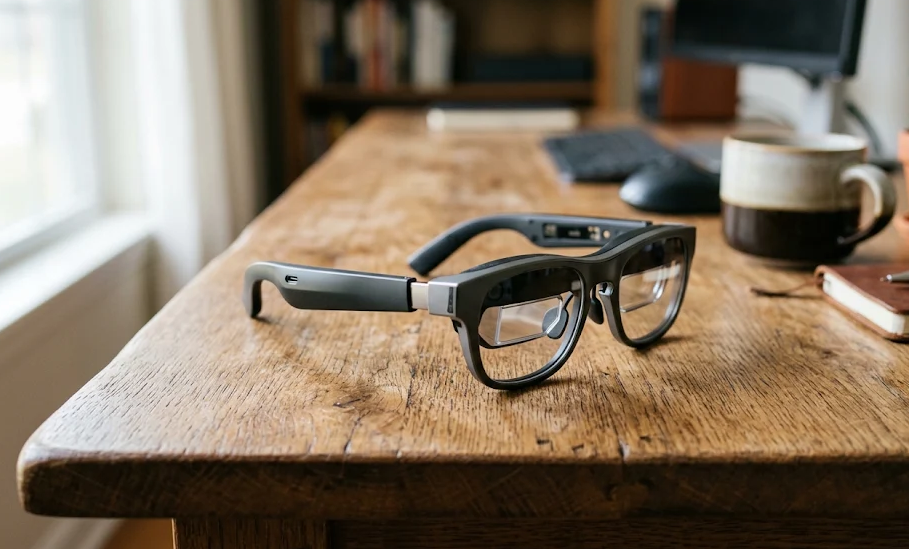
Introduction: Are AR Glasses the Future of Personal Technology?
Augmented Reality (AR) glasses are changing how people interact with digital content. Instead of looking down at a smartphone, sitting in front of a monitor, or carrying a tablet, users can access digital displays directly through wearable eyewear.
From watching movies on a virtual cinema screen to creating a portable multi-monitor workstation, AR glasses promise a more flexible relationship between physical and digital environments.
However, the market is more complicated than it initially appears. Some products function primarily as wearable external monitors, while others introduce spatial computing, AI assistants, cameras, and interactive digital overlays.
This distinction matters because not every product marketed as AR glasses delivers the same experience.
Some are excellent for gaming and entertainment but offer limited spatial interaction. Others prioritize productivity, hands-free information, or real-world navigation.
So, are AR glasses worth buying? Who actually needs them? And which specifications matter when choosing a pair?
This SEE2GET guide examines the technology, practical applications, important specifications, leading products, limitations, and purchasing considerations to help you make an informed decision.
1. What Are AR Glasses?
Augmented Reality glasses are wearable electronic devices that combine traditional eyewear with digital display technology.
They allow users to view digital information while maintaining some level of awareness of their physical surroundings.
Depending on the technology, this information might include:
- Virtual computer displays.
- Navigation directions.
- Notifications and messages.
- Digital objects and 3D models.
- Video and entertainment content.
- Real-time translations and captions.
- Contextual information powered by artificial intelligence.
Unlike conventional monitors, AR glasses place digital content within the user’s field of view.
The objective is to make digital information more accessible without requiring constant interaction with a separate screen.
How Do AR Glasses Work?
Most AR glasses combine several technologies:
1. Micro-OLED displays
Micro-OLED panels generate the images users see through the glasses. These compact displays can deliver high resolution, strong contrast, and vibrant colors.
2. Optical systems
Specialized lenses, mirrors, or waveguides direct the displayed images toward the user’s eyes.
The optical design determines important characteristics such as clarity, field of view, image positioning, and visual comfort.
3. Sensors and tracking
Depending on the model, AR glasses may include:
- Accelerometers.
- Gyroscopes.
- Cameras.
- Depth sensors.
- Proximity sensors.
- Eye-tracking technology.
These components help determine head orientation, movement, and the relationship between digital objects and the surrounding environment.
4. Processing hardware
Some glasses contain dedicated processors for image processing, tracking, and spatial computing.
Others rely on an external smartphone, computer, or gaming device to generate and transmit content.
5. Connectivity
USB-C DisplayPort, Bluetooth, and Wi-Fi are among the technologies used to connect AR glasses with compatible devices.
Importantly, Bluetooth connectivity alone does not mean a pair of glasses can display video. The source device must support the appropriate video-output technology.
2. Understanding the Different Types of AR Glasses
One of the biggest mistakes buyers make is assuming that all smart glasses and AR glasses offer identical functionality.
In reality, there are several distinct product categories.
| Technology | Main Function | Typical Applications | Complexity |
|---|---|---|---|
| Display AR glasses | Project a virtual screen | Movies, gaming, productivity | Low to medium |
| Spatial AR glasses | Position digital content in physical space | Virtual workspaces, 3D interfaces | High |
| AI smart glasses | Provide voice assistance, cameras, and audio | Photography, communication, AI assistance | Medium |
| Optical see-through AR | Overlay digital information onto the real world | Industrial applications, navigation | High |
| Mixed Reality (MR) devices | Combine digital environments with physical surroundings | Training, simulation, collaboration | High |
Display AR Glasses
This is currently one of the most accessible categories.
These products generally resemble sunglasses and connect to smartphones, laptops, or gaming devices.
They create the impression of a large virtual display positioned in front of the user.
Popular applications include:
- Watching movies.
- Playing video games.
- Working with a laptop.
- Using a portable virtual monitor.
- Viewing presentations.
Examples include products from XREAL, VITURE, RayNeo, and Rokid.
Important: Most display glasses do not independently understand or map the surrounding environment. They primarily function as wearable personal displays.
Spatial AR Glasses
Spatial AR glasses introduce more advanced tracking and interaction.
Rather than simply displaying an image in front of the user, they can maintain digital content at particular positions relative to the user’s surroundings.
For example, a virtual screen can remain positioned in a particular location even when the user turns their head.
More advanced systems may support:
- Spatial mapping.
- Hand tracking.
- Environmental awareness.
- 3D object placement.
- Multiple virtual displays.
This category is more appropriate for users interested in spatial computing rather than simply watching content.
AI Smart Glasses
AI smart glasses focus on assistance and communication.
Depending on the model, they may include:
- Cameras.
- Microphones.
- Open-ear speakers.
- Voice assistants.
- Image recognition.
- Translation capabilities.
- Small information displays.
Not every AI smart-glasses product includes an actual visual display.
This is an important distinction: glasses with cameras and AI assistants are not automatically AR display glasses.
3. Who Actually Needs AR Glasses?
AR glasses are not essential for everyone.
Their value depends on how frequently someone uses digital displays, how portable their workflow needs to be, and whether wearable technology offers a meaningful advantage over conventional screens.
Here are the main user groups that can benefit.
3.1 Remote Workers and Professionals
AR glasses can provide a portable alternative to conventional external monitors.
For people working between offices, homes, hotels, and other locations, carrying a large monitor is impractical.
Compatible display glasses can create a private virtual screen connected to a laptop.
Potential benefits include:
- Portable external display functionality.
- Reduced dependence on physical monitors.
- Flexible working environments.
- Private content viewing.
- More convenient travel setups.
However, buyers should understand that a basic display model does not automatically provide multiple independent monitors.
Additional software or hardware may be necessary.
Recommendation: Look for glasses with built-in spatial tracking, good text clarity, and reliable laptop compatibility.
3.2 Gamers
Gaming is one of the strongest use cases for current AR display glasses.
A pair of compatible glasses can turn a gaming handheld into a portable entertainment system with a large virtual screen.
Popular applications include:
- Steam Deck gaming.
- Portable console gaming.
- Smartphone gaming.
- PC gaming.
- Watching gaming content.
Important specifications include:
- Refresh rate.
- Display resolution.
- Motion-to-photon latency.
- Field of view.
- Image stability.
- Audio quality.
For gaming, a 120Hz display can offer smoother motion than a conventional 60Hz display, provided the connected device and content support the higher refresh rate.
Recommendation: Prioritize low latency, display stability, and compatibility with your gaming hardware.
3.3 Frequent Travelers
AR glasses can be particularly useful during long journeys.
They offer a personal viewing experience without requiring a large tablet or laptop display.
Potential applications include:
- Watching movies during flights.
- Streaming entertainment.
- Playing compatible games.
- Viewing downloaded content.
- Connecting to a laptop while traveling.
Their compact form factor makes them attractive for people who regularly travel.
However, display glasses are not a replacement for every travel device. They still require a compatible content source and sufficient power.
Recommendation: Prioritize weight, comfort, portability, and easy connectivity.
3.4 Students and Researchers
AR glasses can support certain learning and research activities.
For example, compatible applications can provide:
- Large virtual reading displays.
- Digital presentations.
- Educational visualizations.
- 3D models.
- Reference material.
- Hands-free information access.
More advanced spatial systems can also help visualize complex structures and digital objects.
Nevertheless, conventional laptops and tablets remain more practical for many educational activities, especially when extensive typing is required.
3.5 Technology Enthusiasts and Early Adopters
People interested in emerging computing technologies may appreciate AR glasses even if they do not have a specific daily requirement.
These products provide an opportunity to explore:
- Spatial computing.
- Wearable displays.
- Head-tracked interfaces.
- 3D content.
- AI-powered interfaces.
- New forms of human-computer interaction.
For enthusiasts, experimentation and access to emerging features may be part of the product’s value.
4. When Should You NOT Buy AR Glasses?
AR glasses have impressive capabilities, but they are not a universal replacement for conventional screens.
You may not need them if:
You already have a comfortable workstation.
A traditional monitor generally provides a more straightforward experience for extended office work.
You primarily need photography features.
Camera-focused smart glasses may be more appropriate than display-oriented AR glasses.
You expect complete standalone functionality.
Many affordable AR glasses depend on an external device for processing, applications, and content.
You need extensive spatial interaction.
Basic display glasses cannot deliver the same functionality as advanced spatial computing systems.
You are uncomfortable wearing glasses for extended periods.
Frame pressure, nose-pad positioning, weight distribution, and optical alignment can significantly affect the experience.
The best buying decision is not necessarily purchasing the most advanced product. It is choosing technology that solves a genuine problem.
5. Essential Specifications: What to Look for Before Buying
Understanding technical specifications is essential when comparing AR glasses.
Manufacturers frequently advertise impressive virtual screen sizes and brightness figures, but these numbers do not always translate into a better real-world experience.
Here are the specifications that deserve the most attention.
5.1 Display Resolution
Resolution determines how much visual detail the displays can reproduce.
Many modern display-oriented AR glasses use Full HD or higher-resolution micro-OLED panels.
For productivity, resolution is particularly important because small text requires good optical clarity.
| Resolution | Typical Experience | Suitability |
|---|---|---|
| 1920 × 1080 per eye | Detailed virtual display | Entertainment and general use |
| 1920 × 1200 per eye | Additional vertical workspace | Productivity and entertainment |
| Higher-resolution displays | Potentially greater visual detail | Advanced applications |
Buying advice: Do not evaluate resolution independently of optical quality. A high-resolution panel cannot compensate for poor edge clarity or an unsuitable optical design.
5.2 Field of View (FOV)
Field of view measures how much of the user’s visual area is occupied by the displayed image.
It is generally expressed in degrees.
A larger FOV can create a more immersive experience and allow more of the virtual display to remain visible without excessive head movement.
Typical considerations:
- 40–45 degrees: More limited viewing area.
- 46–52 degrees: Common personal-display territory.
- 55–60 degrees: Wider viewing experience.
These are approximate comparison categories, not universal quality standards.
A wider FOV is not automatically better. Image clarity, optical alignment, and comfort remain important.
5.3 Refresh Rate
Refresh rate describes how many times per second a display updates its image.
It is measured in Hertz (Hz).
| Refresh Rate | Experience |
|---|---|
| 60Hz | Standard viewing |
| 90Hz | Smoother motion |
| 120Hz | Improved motion clarity for supported content |
| 144Hz and above | Specialized high-refresh applications |
For gaming, higher refresh rates can improve the viewing experience.
However, the connected device must also support the required output.
5.4 Brightness
Brightness determines how visible the virtual image is under different lighting conditions.
Manufacturers may advertise brightness using different measurement methods.
For example, perceived brightness and display-panel brightness are not necessarily equivalent.
This makes direct comparisons difficult.
For buyers, the important questions are:
- Is the display sufficiently bright for indoor environments?
- Can brightness be adjusted?
- Does the product support electronic dimming?
- Is the image still comfortable in different lighting conditions?
Do not choose a product solely because it advertises the highest brightness number.
5.5 Degrees of Freedom: 3DoF vs. 6DoF
This is one of the most important technical distinctions.
3DoF (Three Degrees of Freedom)
Tracks rotational movement:
- Left and right.
- Up and down.
- Tilting the head.
A 3DoF system can help keep a virtual screen positioned relative to the direction of view.
However, it does not independently track the user’s full physical movement through space.
6DoF (Six Degrees of Freedom)
Tracks both rotational and positional movement.
It includes:
- Head rotation.
- Forward and backward movement.
- Left and right movement.
- Up and down movement.
6DoF provides more advanced spatial interaction.
| Feature | 3DoF | 6DoF |
|---|---|---|
| Head rotation tracking | Yes | Yes |
| Positional tracking | No | Yes |
| Anchored virtual screens | Yes, within tracking capabilities | Yes |
| Environmental interaction | Limited | More advanced |
| Spatial computing | Basic | More capable |
Buying advice: For movies and basic virtual displays, 3DoF may be sufficient. For interactive spatial experiences, 6DoF is considerably more useful.
5.6 Connectivity and Compatibility
Compatibility should be checked before purchasing.
Some AR glasses connect directly through USB-C DisplayPort Alt Mode.
Others require adapters or additional hardware.
Check compatibility with:
- Windows computers.
- Mac computers.
- Android smartphones.
- iPhones.
- Steam Deck.
- Nintendo Switch.
- PlayStation systems.
A particularly important detail is that not every USB-C port supports video output.
A phone can have USB-C connectivity without supporting DisplayPort Alt Mode.
Similarly, some gaming consoles require dedicated adapters.
Buying advice: Check the manufacturer’s compatibility list for your exact device model rather than assuming that all USB-C devices will work.
5.7 Comfort and Weight
Comfort is frequently underestimated.
AR glasses sit directly on the nose and ears, so even relatively small differences in weight distribution can influence long-term usability.
Consider:
- Total frame weight.
- Nose-pad adjustment.
- Temple pressure.
- Frame dimensions.
- Interpupillary distance (IPD).
- Prescription support.
- Heat distribution.
A lightweight pair with poor weight distribution may be less comfortable than a slightly heavier model with better ergonomics.
Whenever possible, test the glasses before purchasing.
5.8 Prescription Support
People who wear prescription glasses should pay particular attention to optical compatibility.
Manufacturers may provide:
- Prescription lens inserts.
- Dedicated prescription frames.
- Built-in diopter adjustment.
- Adjustable interpupillary distance.
Some models support only certain prescription ranges.
Buyers should also check whether astigmatism correction is supported through the available prescription accessories.
6. Best AR Glasses to Consider in 2026
The current market offers several interesting options across different price categories.
The following comparison focuses on established display-oriented products rather than treating every AI smart-glasses product as an equivalent alternative.
Our Recommended AR Glasses
| Product | Main Strength | Resolution | FOV | Refresh Rate | Approx. Price (USD) | SEE2GET Rating |
|---|---|---|---|---|---|---|
| XREAL 1S | Best overall balance | 1920 × 1200 per eye | 52° | Up to 120Hz | $449 | 9.2/10 |
| XREAL One Pro | Premium display experience | 1920 × 1080 per eye | 57° | Up to 120Hz | $599 | 9.1/10 |
| RayNeo Air 4 Pro | Value and entertainment | 1920 × 1080 per eye | 46° | Up to 120Hz | $299 | 8.9/10 |
| Rokid Max 2 | Prescription flexibility | 1920 × 1080 per eye | 50° | Up to 120Hz | $249 | 8.6/10 |
Prices are approximate US-market product prices checked against available manufacturer listings in November 2026. Promotions, bundles, and regional availability may change the final price.
SEE2GET ratings are illustrative editorial assessments based on specifications, functionality, positioning, and value. They are not manufacturer ratings or the results of independent laboratory testing.
6.1 XREAL 1S — Best Overall Balance
Approximate price: $449
SEE2GET rating: 9.2/10
The XREAL 1S is an interesting choice for users looking for a combination of display quality, tracking capabilities, and portability.
It uses Sony Micro-OLED display technology and supports a 52-degree field of view.
Key specifications include:
- 1920 × 1200 resolution per eye.
- Up to 120Hz refresh rate.
- 52-degree field of view.
- XREAL X1 processing.
- Native 3DoF tracking.
- Three-level and automatic electrochromic dimming.
- Audio tuned by Bose.
One of its strongest features is native 3DoF functionality.
This allows users to experience a more stable virtual display compared with basic glasses that simply mirror a screen in front of their eyes.
The glasses can connect to compatible smartphones, computers, and gaming devices.
Advantages
- Strong combination of resolution and refresh rate.
- Built-in spatial display tracking.
- Adjustable lens transparency.
- Good versatility across different applications.
- Portable design.
Limitations
- Requires a compatible external device for many applications.
- Does not provide full standalone spatial computing.
- Additional accessories may increase the total purchase cost.
Best for: Users who want one pair of AR glasses for gaming, entertainment, and general productivity.
6.2 XREAL One Pro — Best Premium Display Experience
Approximate price: $599
SEE2GET rating: 9.1/10
The XREAL One Pro targets buyers who prioritize premium display quality and a wider viewing experience.
It features Sony Micro-OLED panels and the XREAL X1 chip.
Key specifications:
- 1920 × 1080 resolution per eye.
- 57-degree field of view.
- Up to 120Hz refresh rate.
- Native 3DoF tracking.
- Up to 700 nits perceived brightness.
- Electrochromic dimming.
- Bose-tuned audio.
- Approximately 87g weight.
The wider field of view is one of its main advantages.
It can create a more expansive virtual display, particularly useful for entertainment and certain productivity applications.
The integrated processing also means users can access tracking functionality without necessarily depending on a separate computing accessory.
Advantages
- Wide field of view.
- Premium micro-OLED display technology.
- Native spatial tracking.
- Strong audio integration.
- Adjustable transparency.
Limitations
- More expensive than several competing products.
- Requires compatible external hardware for many applications.
- Its advantages may not justify the additional cost for casual users.
Best for: Enthusiasts, frequent travelers, and users who regularly rely on wearable displays.
6.3 RayNeo Air 4 Pro — Best Value for Entertainment
Approximate price: $299
SEE2GET rating: 8.9/10
RayNeo positions the Air 4 Pro as an entertainment-oriented display product.
Its biggest attraction is the combination of display features and a relatively accessible price.
Key specifications:
- Full HD micro-OLED display.
- 46-degree field of view.
- Up to 120Hz refresh rate.
- HDR10 support.
- Up to 1,200 nits advertised brightness.
- Bang & Olufsen-tuned quad-speaker system.
- Approximately 76g weight.
The glasses support compatible USB-C video sources and can also connect to HDMI devices through an appropriate adapter.
They are particularly interesting for watching movies and playing games.
However, buyers should understand that the Air 4 Pro uses a follow-style display rather than native 3DoF screen anchoring.
This means the viewing experience differs from models with built-in spatial tracking.
Advantages
- Competitive pricing.
- HDR10 support.
- High advertised brightness.
- Good entertainment-oriented specifications.
- Multiple connectivity options.
Limitations
- No native 3DoF tracking.
- Additional adapters may be required.
- Less suitable for users who prioritize spatial productivity.
Best for: First-time buyers, movie enthusiasts, and portable gaming users.
6.4 Rokid Max 2 — Best for Prescription Flexibility
Approximate price: $249
SEE2GET rating: 8.6/10
The Rokid Max 2 offers an interesting feature for people who are short-sighted.
It includes built-in myopia adjustment, reducing the need for prescription inserts within its supported range.
Key specifications include:
- 1920 × 1080 resolution per eye.
- 50-degree field of view.
- Up to 120Hz refresh rate.
- Built-in myopia adjustment.
- Approximately 75g weight.
- Integrated audio.
Its pricing makes it an attractive entry point into display glasses.
However, some advanced spatial functionality requires additional Rokid hardware.
Buyers should also understand the limitations of built-in prescription adjustment, particularly if they have astigmatism or a prescription outside the supported range.
Advantages
- Attractive price.
- Built-in myopia adjustment.
- Lightweight design.
- High refresh rate.
- Suitable for entertainment and compatible gaming devices.
Limitations
- No native 3DoF tracking in the basic glasses.
- Some advanced functionality requires additional hardware.
- Prescription adjustment does not replace every type of corrective lens.
Best for: Budget-conscious users who want a portable personal display and benefit from built-in myopia adjustment.
7. Detailed Comparison: Which AR Glasses Should You Choose?
Looking at specifications individually is useful, but comparing products based on actual requirements makes the buying decision easier.
Comparison by Use Case
| User Requirement | Recommended Product | Why |
|---|---|---|
| General-purpose AR display | XREAL 1S | Balanced specifications and native 3DoF |
| Premium display quality | XREAL One Pro | Wider FOV and premium optics |
| Movies and entertainment | RayNeo Air 4 Pro | HDR10 and entertainment-focused features |
| Portable gaming | XREAL 1S | High refresh rate and spatial tracking |
| Budget purchase | Rokid Max 2 | Competitive entry price |
| Built-in myopia adjustment | Rokid Max 2 | Integrated diopter adjustment |
| Spatial productivity | XREAL 1S / One Pro | Native 3DoF support |
Comparison by Technical Priority
| Feature | XREAL 1S | XREAL One Pro | RayNeo Air 4 Pro | Rokid Max 2 |
|---|---|---|---|---|
| Micro-OLED | Yes | Yes | Yes | Yes |
| 120Hz support | Yes | Yes | Yes | Yes |
| Native 3DoF | Yes | Yes | No | No |
| HDR10 | Not listed as a core feature | Not listed as a core feature | Yes | Not listed as a core feature |
| Electronic dimming | Yes | Yes | Not specified as equivalent electrochromic dimming | No |
| Prescription support | Inserts | Inserts | Prescription inserts | Built-in myopia adjustment |
| Best application | All-round use | Premium viewing | Entertainment | Budget viewing |
Specifications are based on manufacturer information. Features and compatibility may depend on firmware, accessories, and connected devices.
8. How Much Should You Spend on AR Glasses?
The AR glasses market covers several price levels.
A higher price does not necessarily mean a better purchase.
The right budget depends on whether you need a basic personal display, advanced tracking, or a more sophisticated spatial-computing experience.
AR Glasses Price Categories
| Price Range (USD) | Product Category | What to Expect |
|---|---|---|
| Under $250 | Entry-level | Basic display functionality and limited advanced features |
| $250–$350 | Budget to mid-range | Better displays, higher refresh rates, and improved ergonomics |
| $350–$500 | Mid-range | Stronger display specifications and more versatile functionality |
| $500–$700 | Premium | Advanced optics, tracking, and improved display experiences |
| $700+ | Advanced systems | Specialized gaming, AI, or spatial-computing capabilities |
These are approximate market segments rather than strict technical classifications.
What Is the Sweet Spot?
For most first-time buyers, the $250–$450 range is a sensible starting point.
This price category includes products capable of delivering an impressive personal-display experience without requiring a major investment.
Users who specifically need native spatial tracking or premium optics may find the $450–$600 category more appropriate.
Spending more makes sense only when the additional features solve a genuine requirement.
9. Important Buying Mistakes to Avoid
Even technically advanced AR glasses can become disappointing purchases if buyers overlook a few important details.
Here are the most common mistakes.
Mistake 1: Confusing Screen Size With Display Quality
Manufacturers frequently advertise enormous virtual screen sizes.
However, a virtual screen’s advertised equivalent size does not tell you everything about image clarity.
Resolution, field of view, optical quality, and viewing distance all influence the actual experience.
Mistake 2: Ignoring Device Compatibility
A pair of AR glasses may work perfectly with one smartphone but fail to display video from another.
Always verify DisplayPort Alt Mode or the required connectivity standard.
Mistake 3: Assuming Every Model Supports 6DoF
Basic display glasses do not necessarily offer positional tracking.
Check whether spatial functionality is built into the glasses or requires additional hardware.
Mistake 4: Ignoring Prescription Requirements
Prescription inserts can add to the overall purchase price.
Check supported prescriptions, IPD compatibility, and the availability of suitable corrective lenses before ordering.
Mistake 5: Choosing Based Only on Brightness
Higher advertised brightness does not automatically mean better image quality.
Contrast, color accuracy, optical design, and real-world viewing conditions also matter.
Mistake 6: Forgetting Accessory Costs
Some glasses require additional accessories for certain devices.
Possible expenses include:
- HDMI adapters.
- Portable computing accessories.
- Prescription inserts.
- Charging accessories.
- Dedicated gaming docks.
Calculate the complete setup cost rather than comparing only the base product price.
Mistake 7: Expecting a Complete Computer Replacement
Most affordable AR glasses are display peripherals rather than independent computers.
They still depend on external devices for processing, applications, and content.
10. Are AR Glasses Safe and Comfortable to Use?
Comfort and responsible use deserve consideration before purchasing wearable display technology.
AR glasses are designed for use close to the eyes, and the experience can vary considerably between individuals.
Important considerations include:
Visual comfort
Poor optical alignment, unsuitable focus settings, or an incorrectly fitted device can make viewing uncomfortable.
Choose a product that supports your visual requirements.
Breaks during extended sessions
Avoid treating AR glasses as something that must be worn continuously.
Take regular breaks and stop using them if you experience discomfort, headaches, or visual symptoms.
Environmental awareness
Display glasses can obstruct or distract from parts of the surrounding environment.
Avoid wearing them while driving, cycling, crossing roads, or performing activities that require full attention.
Privacy
AI smart glasses with cameras and microphones introduce additional privacy considerations.
Be aware of recording indicators, local rules, and the privacy of people around you.
Eye health
Do not assume that a product advertised as eye-friendly eliminates the need for responsible viewing habits.
If you have existing vision concerns, consult an eye-care professional about suitability.
11. The Future of AR Glasses
The technology is still developing.
Although today’s products are already useful as wearable displays, several developments could make future AR systems considerably more capable.
Better Optical Technology
Future optical systems may provide:
- Wider fields of view.
- Higher-resolution displays.
- Improved brightness.
- Smaller optical components.
- Better edge-to-edge clarity.
The objective is to make AR glasses increasingly similar to conventional eyewear while maintaining useful digital-display capabilities.
More Advanced Spatial Computing
Spatial tracking is likely to remain an important development area.
More capable systems could support:
- Persistent digital objects.
- Multiple spatial displays.
- Better environmental mapping.
- More natural hand interaction.
- Advanced 3D interfaces.
AI Integration
Artificial intelligence could make wearable displays more context-aware.
Potential applications include:
- Real-time translation.
- Contextual assistance.
- Visual recognition.
- Voice-controlled interfaces.
- Personalized information.
Improved Battery Efficiency
Battery consumption remains an important engineering challenge.
More efficient processors, display technologies, and wireless connectivity could improve the practicality of standalone wearable devices.
Lighter and More Natural Designs
Comfort is essential for mainstream adoption.
Future designs will likely focus on reducing weight, improving balance, and making the technology less visually intrusive.
12. Final Verdict: Which AR Glasses Are Worth Buying?
AR glasses have moved beyond experimental technology.
They already offer practical advantages for entertainment, gaming, portable productivity, and personal displays.
However, the market remains divided between simple display glasses and more advanced spatial-computing systems.
For most buyers, the most important decision is identifying the actual problem they want to solve.
Our Final Recommendations
| Buyer Profile | Our Recommendation | Approx. Price (USD) | Rating |
|---|---|---|---|
| First-time AR buyer | XREAL 1S | $449 | 9.2/10 |
| Premium technology enthusiast | XREAL One Pro | $599 | 9.1/10 |
| Movie and entertainment enthusiast | RayNeo Air 4 Pro | $299 | 8.9/10 |
| Budget-conscious buyer | Rokid Max 2 | $249 | 8.6/10 |
Our overall recommendation: XREAL 1S.
Its combination of display resolution, refresh rate, native 3DoF tracking, and versatility makes it a compelling option for buyers who want a general-purpose wearable display.
However, the RayNeo Air 4 Pro offers an attractive alternative for entertainment-focused users, while the Rokid Max 2 deserves attention from buyers who prioritize affordability and built-in myopia adjustment.
The XREAL One Pro is worth considering if premium optics and a wider field of view justify the additional investment.
Ultimately, the best AR glasses are not necessarily the most expensive or technologically advanced.
They are the ones that integrate naturally into your existing devices, solve a practical problem, and provide a comfortable experience over time.
Frequently Asked Questions About AR Glasses
1. What are AR glasses used for?
AR glasses are used for viewing digital content through wearable displays. Depending on the product, applications include movies, gaming, productivity, navigation, communication, and spatial computing.
2. Are AR glasses worth buying in 2026?
Yes, for users who regularly need portable displays, gaming screens, or wearable digital interfaces. However, they are not essential for everyone, and their usefulness depends on compatibility and individual requirements.
3. Can AR glasses replace a computer monitor?
They can replace a monitor for certain activities, particularly portable entertainment and basic productivity. However, conventional monitors generally remain more practical for extensive office work and applications requiring precise visual layouts.
4. Do AR glasses work without a smartphone?
Some models can connect directly to laptops, computers, and gaming devices. However, most affordable display glasses require an external device to provide content and processing.
More advanced standalone systems offer greater independence.
5. Can you watch Netflix on AR glasses?
Yes, provided the glasses are connected to a compatible device or streaming system capable of running the service.
Content availability and playback compatibility depend on the connected hardware and software.
6. Are AR glasses the same as VR headsets?
No.
AR glasses generally allow users to maintain awareness of their physical surroundings while viewing digital content.
VR headsets primarily create an immersive virtual environment that replaces most or all of the user’s direct view of the physical world.
7. Can people who wear prescription glasses use AR glasses?
Yes. Many products support prescription inserts or dedicated corrective lenses.
Some models also provide built-in myopia adjustment, although this does not necessarily accommodate every prescription.
8. What is the difference between 3DoF and 6DoF?
3DoF tracks rotational head movement, while 6DoF additionally tracks positional movement through space.
6DoF is more suitable for advanced spatial interaction.
9. Are AR glasses suitable for gaming?
Yes. Compatible AR glasses can create large virtual gaming displays for handheld consoles, smartphones, and computers.
Look for high refresh rates, low latency, and device compatibility.
10. What is a reasonable budget for AR glasses?
A budget of approximately $250–$450 provides access to several capable display-oriented products.
Premium models with more advanced tracking and optical technology can cost considerably more.
11. Do AR glasses have built-in batteries?
It depends on the category.
Many wired display glasses receive power from their connected devices and do not contain a large internal battery.
Standalone smart glasses and spatial-computing systems generally require their own power source.
12. What should I check before purchasing AR glasses?
Prioritize these factors:
- Compatibility with your existing devices.
- Display resolution and optical clarity.
- Field of view.
- Refresh rate.
- Tracking capabilities.
- Comfort and weight.
- Prescription support.
- Accessory requirements.
- Warranty and return policy.
- Total ownership cost.
SEE2GET Buying Advice: Focus on practical functionality rather than marketing claims. A well-matched $299 product can provide significantly more value than a premium device whose advanced features you rarely use.