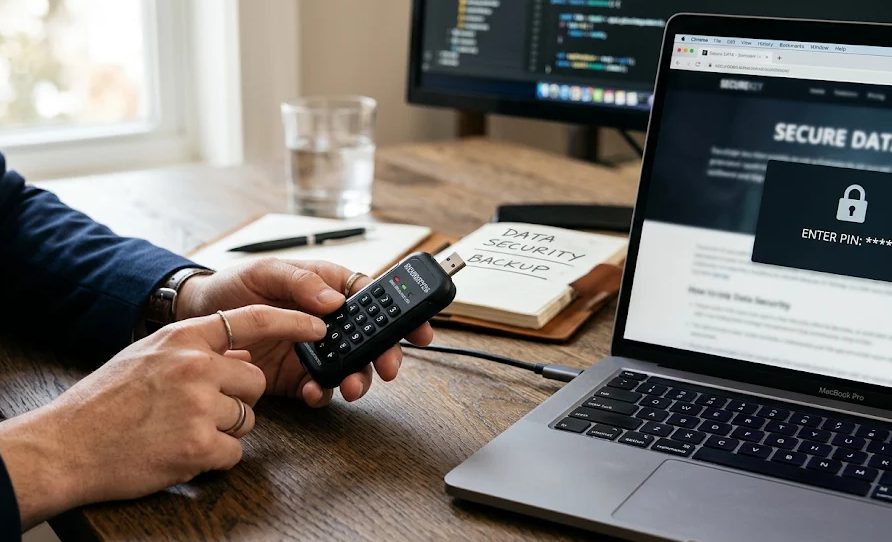
A USB flash drive is convenient, portable, and inexpensive. However, convenience becomes a security problem when the drive contains confidential documents, business records, financial information, or personal files. If someone finds a lost USB drive, ordinary storage devices offer little protection against unauthorized access.
Hardware-encrypted flash drives with physical keypads address this problem by combining dedicated encryption hardware with an integrated PIN-entry system. Instead of relying on a password entered through a computer, users unlock the device directly using its physical buttons.
These devices are particularly useful for professionals handling sensitive information, organizations with strict data protection requirements, and individuals who frequently transport confidential files.
However, not all encrypted USB drives provide the same level of protection. Encryption standards, authentication mechanisms, physical durability, certification status, storage capacity, and recovery options can differ considerably.
This guide explains how keypad-encrypted flash drives work, who benefits most from them, which specifications matter, and how to select the right model.
Quick Verdict: Are Keypad-Encrypted Flash Drives Worth Buying?
For users who regularly transport sensitive information, a hardware-encrypted USB drive with a physical keypad can be a worthwhile investment.
The main advantage is that security is built into the storage device itself. Authentication and encryption do not depend on installing a particular application or trusting the security of the computer being used.
Here are three products worth considering:
| Product | Our Rating | Best For | Encryption | Observed US Price |
|---|---|---|---|---|
| Kingston IronKey Keypad 200 | 9.4/10 | Best overall | 256-bit AES-XTS | $164.99 (64GB) |
| iStorage datAshur PRO2 | 9.0/10 | Advanced security features | 256-bit AES-XTS | $194.95 (32GB) |
| Apricorn Aegis Secure Key 3NX | 8.7/10 | Business and professional use | 256-bit AES-XTS | $169.00 (32GB) |
Ratings are SEE2GET editorial assessments, not manufacturer ratings or customer-review averages. Prices are observed US retailer listings and can change. Capacities are specified to make price comparisons more transparent.
1. What Is a Hardware-Encrypted Flash Drive with a Physical Keypad?
A hardware-encrypted flash drive with a physical keypad is a portable USB storage device that protects stored information using a dedicated encryption processor and an integrated physical authentication system.
It looks similar to a conventional USB flash drive, but it has an additional feature: a built-in keypad that allows users to enter a personal identification number (PIN) before accessing stored files.
The device generally combines three essential components:
1. Flash memory
This is where documents, photographs, spreadsheets, backups, and other digital information are stored.
2. Dedicated encryption hardware
A separate cryptographic processor handles encryption and decryption. Data is protected automatically rather than relying exclusively on software installed on the connected computer.
3. Physical authentication keypad
A small integrated keypad allows the owner to enter an administrator or user PIN directly on the device.
The drive remains locked until the correct authentication credentials are provided.
How Does It Work?
The operating principle is relatively straightforward:
- The user connects the USB drive to a computer or compatible device.
- The user enters the correct PIN using the physical keypad.
- The drive authenticates the PIN internally.
- Once authentication succeeds, the encrypted storage becomes accessible.
- The computer can read and write files through the USB connection.
- The drive locks again when disconnected or when its automatic locking conditions are triggered.
The exact unlocking sequence varies between manufacturers.
Some devices allow PIN entry before connecting to a computer, while others support different authentication workflows.
An important distinction is that the computer does not need to know the user’s PIN. Authentication happens inside the storage device.
This reduces dependence on potentially untrusted host computers.
Hardware Encryption vs. Software Encryption
Not every USB drive advertised as encrypted uses dedicated encryption hardware.
Software-encrypted drives typically rely on an application or operating-system feature to encrypt files or volumes.
Hardware-encrypted devices perform cryptographic operations inside the drive.
| Feature | Software-Encrypted USB | Hardware-Encrypted USB |
|---|---|---|
| Encryption processing | Computer processor | Dedicated device hardware |
| Authentication | Usually software-based | Often integrated keypad |
| Software installation | Frequently required | Generally unnecessary |
| Operating-system dependence | Can be significant | Usually lower |
| Protection against host malware | Depends on implementation | Better separation of authentication |
| Ease of use across computers | Can vary | Generally excellent |
| Dedicated security processor | Not necessarily | Yes |
| Typical purchase price | Lower | Higher |
Hardware encryption does not make a device invulnerable. Malware can still access files while the drive is unlocked, and vulnerabilities in firmware or implementation can undermine security.
Nevertheless, properly designed hardware-encrypted drives provide important security advantages.
2. How Does the Encryption Technology Work?
Understanding encryption specifications is essential when comparing premium secure USB drives.
Three technical characteristics deserve particular attention: AES encryption, XTS mode, and cryptographic certification.
AES-256 Encryption
Advanced Encryption Standard (AES) is a widely adopted symmetric encryption algorithm.
It uses the same underlying secret key for encryption and decryption.
AES supports three standard key lengths:
- AES-128
- AES-192
- AES-256
The number represents the encryption key length in bits.
AES-256 provides an exceptionally large key space and is commonly used in security-sensitive storage applications.
However, a 256-bit specification alone does not guarantee that a USB drive is secure.
Implementation quality, key management, authentication, firmware security, and physical protection also matter.
XTS-AES: Why It Matters for Storage
Many professional encrypted USB drives use XTS-AES.
XTS is a mode of operation designed specifically for protecting data stored in sectors, making it suitable for storage devices.
Its main purpose is to protect individual data sectors while maintaining the ability to access different storage locations independently.
For consumers, the practical takeaway is simple:
When comparing hardware-encrypted storage devices, XTS-AES 256-bit is a desirable specification.
However, XTS is not an authentication mechanism. It does not independently guarantee the integrity or authenticity of stored data.
What Is FIPS 140-3 Certification?
FIPS 140-3 is a US government standard used to evaluate cryptographic modules.
It examines security-related aspects such as:
- Cryptographic algorithms and implementation.
- Authentication mechanisms.
- Physical security.
- Operational requirements.
- Protection of sensitive security parameters.
- Security testing and documentation.
FIPS 140-3 includes four security levels.
| Level | General Security Focus | Typical Application |
|---|---|---|
| Level 1 | Basic cryptographic module requirements | General-purpose security products |
| Level 2 | Additional physical security and tamper evidence | Professional environments |
| Level 3 | Stronger physical protection and identity-based authentication | Sensitive enterprise environments |
| Level 4 | Advanced protection against sophisticated physical attacks | Highly specialized environments |
For organizations with formal compliance requirements, FIPS validation can be an important purchasing criterion.
Important: A manufacturer advertising FIPS-compatible encryption is not necessarily advertising a FIPS-validated product.
Buyers should verify the exact product, cryptographic module, certificate number, and validation status through the official NIST Cryptographic Module Validation Program.
For example, the Kingston IronKey Keypad 200 Series has FIPS 140-3 Level 3 validation under certificate #5133.
Source: NIST Cryptographic Module Validation Program.
3. Who Needs a Hardware-Encrypted USB Drive?
These products are not necessary for every computer user.
Someone who occasionally transfers non-sensitive photographs or ordinary documents probably does not need to spend significantly more on a dedicated encrypted storage device.
However, certain professional and personal situations make the investment considerably more attractive.
IT Professionals and System Administrators
IT professionals frequently transport configuration files, system documentation, recovery information, and administrative resources.
A keypad-encrypted drive provides an additional layer of protection if the device is misplaced.
It is also useful when working across different computers where installing encryption software is inconvenient or prohibited.
Business Owners and Corporate Employees
Businesses regularly handle confidential information, including:
- Internal financial reports.
- Business strategies.
- Customer records.
- Contracts and agreements.
- Employee documentation.
- Intellectual property.
A lost conventional USB drive can create a significant data protection incident.
Hardware encryption helps reduce the risk of unauthorized access, provided the device remains properly locked.
Lawyers and Legal Professionals
Legal professionals often work with confidential client information.
An encrypted USB drive can help protect:
- Case documentation.
- Contracts.
- Legal correspondence.
- Evidence files.
- Research materials.
The ability to unlock the drive independently of the host computer is particularly useful when working across different offices or professional environments.
Healthcare Professionals
Healthcare organizations handle highly sensitive patient information.
A secure USB drive may be appropriate for approved data-transfer workflows, particularly where portable storage is permitted by organizational policies.
However, encryption alone does not establish regulatory compliance.
Healthcare organizations must also consider access controls, approved devices, data-handling procedures, and applicable privacy regulations.
Journalists and Researchers
Journalists, investigators, and researchers may need to protect interviews, unpublished research, confidential documents, and source-related material.
Physical keypad authentication provides a convenient way to secure portable information without depending on host-computer software.
Frequent Travelers
Travel creates additional opportunities for storage devices to become lost, stolen, or temporarily inaccessible.
An encrypted drive can reduce the risk associated with physical loss.
This is particularly relevant for people transporting professional documents between offices, clients, or international destinations.
Who Probably Does Not Need One?
A premium encrypted USB drive may be unnecessary if you:
- Only transfer ordinary personal files.
- Rarely use portable storage.
- Do not store confidential information.
- Already have an appropriate encrypted cloud-storage workflow.
- Have no requirement for physical PIN authentication.
In those situations, a conventional USB drive combined with appropriate software-based encryption may be sufficient.
4. Best Hardware-Encrypted Flash Drives with Physical Keypads
The market for keypad-encrypted USB storage is relatively specialized.
A few established manufacturers dominate this category, offering different combinations of encryption, certifications, physical protection, and administrative features.
Below are three notable options.
1. Kingston IronKey Keypad 200 — Best Overall
Editorial rating: 9.4/10
The Kingston IronKey Keypad 200 is a strong all-around option for buyers who want advanced hardware encryption without complicated software installation.
It combines an integrated physical keypad with AES-XTS 256-bit hardware encryption.
Its FIPS 140-3 Level 3 validation is an important advantage for organizations that require independently validated cryptographic modules.
Key specifications include:
- AES-XTS 256-bit hardware encryption.
- FIPS 140-3 Level 3 validation.
- USB-A and USB-C versions.
- Storage capacities from 16GB to 512GB.
- IP68 dust and water resistance.
- Administrator and user PIN options.
- Global and session-based read-only modes.
- Three-year limited warranty.
One particularly useful feature is the availability of read-only modes.
An administrator can configure the device so that users can access stored information without modifying it.
Session-based read-only functionality also helps reduce the risk of unwanted changes when connecting to potentially untrusted computers.
The drive uses a dedicated battery to support keypad operation.
Advantages
- Strong, independently validated cryptographic security.
- Multiple connector options.
- No dependence on host-computer authentication software.
- IP68 protection.
- Useful administrator controls.
Limitations
- More expensive than ordinary USB storage.
- The keypad and PIN workflow require some familiarization.
- Maximum capacity is 512GB.
- USB-A and USB-C models must be selected carefully.
Observed US pricing: A 64GB USB-A model was listed at $164.99 by B&H Photo Video.
Best for: Business professionals, IT departments, and individual users who want a strong combination of security, compatibility, and usability.
Official specifications: Kingston IronKey Keypad 200.
2. iStorage datAshur PRO2 — Best for Advanced Security Features
Editorial rating: 9.0/10
The iStorage datAshur PRO2 is another established option in the hardware-encrypted USB category.
It features an integrated physical keypad and dedicated encryption hardware.
Its design focuses on protecting sensitive information while supporting use across different operating systems and computing environments.
Key specifications include:
- AES-XTS 256-bit hardware encryption.
- FIPS 140-2 Level 3 certification.
- Integrated alphanumeric keypad.
- USB 3.2 connectivity.
- Capacities from 4GB to 512GB.
- IP68 dust and water resistance.
- Automatic locking functionality.
- Brute-force protection.
- User PIN and recovery functionality.
- Three-year warranty.
A notable feature is its use of a secure microprocessor designed to provide additional protection for cryptographic operations.
The device also supports read-only operation and self-destruct functionality.
The latter is an important consideration when evaluating recovery procedures: security features designed to destroy protected data can also make forgotten credentials particularly consequential.
The datAshur PRO2 is especially interesting for organizations that need more than basic encryption.
Advantages
- Comprehensive security feature set.
- Physical PIN authentication.
- Strong environmental protection.
- Broad operating-system compatibility.
- Recovery and administrative functionality.
Limitations
- Higher purchase price.
- Uses USB-A rather than offering a native USB-C variant.
- FIPS 140-2 is an older standard than FIPS 140-3.
- Its advanced security options require careful configuration.
Observed US pricing: The 32GB version was listed at $194.95 by B&H Photo Video.
Best for: Professionals and organizations that prioritize additional security controls and administrative features.
Official specifications: iStorage datAshur PRO2.
3. Apricorn Aegis Secure Key 3NX — Best for Professional and Business Use
Editorial rating: 8.7/10
The Apricorn Aegis Secure Key 3NX is a compact hardware-encrypted flash drive with an integrated keypad.
It is designed for professional environments where portable data protection is important.
The device combines AES-XTS 256-bit encryption with onboard PIN authentication.
Its technical specifications include:
- AES-XTS 256-bit hardware encryption.
- FIPS 140-2 Level 3 certification.
- USB Type-A connectivity.
- Capacities from 4GB to 512GB.
- IP67 environmental protection.
- Up to 171MB/s read speed.
- Up to 160MB/s write speed.
- Three-year limited warranty.
One interesting feature is its support for multiple PIN configurations, making it suitable for certain shared-storage workflows.
The device also offers a rugged construction designed to withstand demanding handling conditions.
Its FIPS 140-2 certification is worth considering carefully if your organization requires a specific current validation standard.
Advantages
- Strong hardware encryption.
- Physical keypad authentication.
- Rugged construction.
- Multiple PIN configurations.
- Competitive performance specifications.
Limitations
- Uses the older FIPS 140-2 standard.
- USB-A connectivity only.
- IP67 rather than IP68 protection.
- Availability and pricing can vary considerably.
Observed US pricing: The 32GB model was listed at $169.00 by SHI.
Best for: Business users and professionals who need a rugged encrypted drive with flexible PIN management.
Official specifications: Apricorn Aegis Secure Key 3NX.
5. Detailed Comparison: Which Drive Offers the Best Features?
The following table compares the three products across the specifications that matter most.
| Specification | Kingston KP200 | iStorage PRO2 | Apricorn 3NX |
|---|---|---|---|
| Encryption | AES-XTS 256-bit | AES-XTS 256-bit | AES-XTS 256-bit |
| Authentication | Physical keypad | Physical keypad | Physical keypad |
| FIPS standard | 140-3 Level 3 | 140-2 Level 3 | 140-2 Level 3 |
| Storage capacity | Up to 512GB | Up to 512GB | Up to 512GB |
| Connector | USB-A / USB-C | USB-A | USB-A |
| Environmental rating | IP68 | IP68 | IP67 |
| Maximum listed read speed | 280MB/s | 168MB/s | 171MB/s |
| Maximum listed write speed | 200MB/s | 128MB/s | 160MB/s |
| Warranty | 3 years | 3 years | 3 years |
| Editorial rating | 9.4/10 | 9.0/10 | 8.7/10 |
Maximum speeds depend on the specific capacity and connector version. These are manufacturer-published figures, not independently measured benchmark results. Environmental ratings do not establish resistance to every type of physical damage.
Which Product Wins?
Best overall: Kingston IronKey Keypad 200
Its FIPS 140-3 Level 3 validation, USB-C availability, and combination of security and convenience make it the strongest general recommendation.
Best advanced feature set: iStorage datAshur PRO2
It offers an extensive selection of security and administrative features, although its older FIPS standard should be considered.
Best professional alternative: Apricorn Aegis Secure Key 3NX
It combines a rugged design, multiple PIN configurations, and good published performance.
6. How to Choose the Best Hardware-Encrypted Flash Drive
Choosing an encrypted USB drive requires more consideration than simply comparing storage capacities.
A product with a large capacity or an impressive encryption specification may not necessarily be the right choice.
The following factors should guide your purchasing decision.
1. Examine the Encryption Standard
Start by checking the encryption technology.
For professional applications, AES-XTS 256-bit hardware encryption is a strong specification.
However, look beyond the marketing description.
Check whether:
- Encryption is performed by dedicated hardware.
- The device encrypts the entire storage area.
- Cryptographic keys are protected internally.
- The manufacturer publishes technical documentation.
- The cryptographic module has independent validation where required.
Avoid treating the phrase military-grade encryption as proof of a particular security level.
2. Check FIPS Validation
If the drive will be used in a regulated or government-related environment, certification can be particularly important.
FIPS 140-3 is the newer standard compared with FIPS 140-2.
However, an older validated product is not automatically insecure.
The important considerations are the actual validation status, certificate details, applicable procurement requirements, and whether the validated configuration matches the product being purchased.
Always verify certificate information directly through NIST.
3. Evaluate PIN Security
The physical keypad is one of the most important components.
Consider the following:
- Does the drive support administrator and user PINs?
- Can an administrator reset a user PIN?
- Is there a recovery mechanism?
- Does the device automatically lock after inactivity?
- Does it limit unsuccessful authentication attempts?
- What happens after the maximum number of incorrect attempts?
The last question deserves particular attention.
Many secure USB drives include brute-force protection that can permanently erase stored information after repeated incorrect authentication attempts.
This improves protection against unauthorized access but introduces a risk of accidental data loss.
Read the manual before configuring the device.
4. Choose the Right USB Connector
Connector compatibility affects everyday usability.
| Connector | Advantages | Limitations |
|---|---|---|
| USB-A | Broad compatibility with older computers | Less convenient on some modern laptops |
| USB-C | Works with many newer laptops, tablets, and phones | Compatibility depends on device support |
| Dual connector | Flexible across different hardware | Not commonly available in every secure-drive range |
If you primarily use modern laptops, USB-C is worth prioritizing.
However, check whether the particular USB-C version provides the same performance and capacity options as its USB-A counterpart.
5. Select an Appropriate Storage Capacity
Encrypted flash drives are generally more expensive per gigabyte than conventional USB storage.
Therefore, buying substantially more capacity than necessary can increase costs without providing meaningful benefits.
Consider the following general guidelines:
| Capacity | Suitable Applications |
|---|---|
| 16GB | Small document collections |
| 32GB | Office documents and professional files |
| 64GB | Larger document collections and presentations |
| 128GB | Mixed professional files and media |
| 256GB | Larger archives and project collections |
| 512GB | Extensive professional data collections |
These are general usage suggestions rather than strict requirements.
Remember that advertised capacity and usable storage capacity are not identical because formatting and device functions consume some space.
6. Consider Physical Protection
Portable storage devices are frequently exposed to everyday environmental hazards.
Look for protection against:
- Dust.
- Water.
- Physical impact.
- Temperature changes.
- Connector damage.
- Keypad wear.
IP ratings are particularly useful.
IP67: Dust-tight and protected against temporary immersion under specified laboratory conditions.
IP68: Dust-tight and protected against immersion under conditions specified by the manufacturer.
An IP68 rating does not mean that every drive can withstand unlimited underwater exposure.
Check the manufacturer’s stated testing conditions.
7. Check Automatic Locking
Automatic locking is a valuable security feature.
It reduces the time a drive remains accessible when someone forgets to disconnect it.
Look for configurable inactivity timers and clear information about what happens when the USB connection is interrupted.
The ideal implementation should provide convenient everyday operation without compromising protection.
8. Investigate Recovery Options
Security features are only useful when they are manageable.
A forgotten PIN can make encrypted storage inaccessible.
Before purchasing, investigate:
- Administrator PIN functionality.
- User PIN recovery.
- One-time recovery options.
- Whether recovery requires a separate credential.
- Whether failed authentication can erase the drive.
- Whether the manufacturer can assist with recovery.
Do not assume that customer support can recover encrypted files.
If the necessary credentials or encryption keys are lost, recovery may be impossible.
9. Examine Warranty and Manufacturer Support
Secure storage devices are specialized products.
Reliable technical support is particularly important when dealing with PIN configuration, firmware, compatibility, and security features.
Compare:
- Warranty duration.
- Technical support availability.
- Firmware documentation.
- Security advisories.
- Product lifecycle information.
- Replacement policies.
A cheaper device may become a poor investment if the manufacturer provides limited support.
7. Physical Keypad vs. Fingerprint Authentication
Some encrypted USB products use biometric authentication rather than a physical keypad.
Both approaches offer advantages, but they solve slightly different usability problems.
| Feature | Physical Keypad | Fingerprint Authentication |
|---|---|---|
| Authentication method | PIN | Biometric |
| Requires remembering credentials | Yes | Usually not for routine unlocking |
| Hardware dependence | Keypad and secure processor | Fingerprint sensor and secure processor |
| Shared access | Multiple PIN configurations on some models | Depends on biometric enrollment |
| Potential authentication difficulties | Forgotten PIN or keypad wear | Sensor or fingerprint recognition problems |
| Credential replacement | PIN can generally be changed | Fingerprint enrollment can be changed |
| Ease of use | Requires PIN entry | Convenient when recognition works |
A physical keypad is often preferable for professional environments where users need a straightforward authentication method that does not depend on biometric recognition.
Fingerprint authentication may be more convenient for individual users.
However, buyers should evaluate the actual security implementation rather than assuming that either method is automatically superior.
8. Important Security Features Worth Paying Extra For
Not every additional security feature deserves a higher purchase price.
Some, however, can provide meaningful protection.
| Security Feature | Importance | Why It Matters |
|---|---|---|
| AES-XTS 256-bit encryption | Essential | Protects stored information |
| Dedicated encryption processor | Essential | Keeps encryption operations inside the device |
| Physical PIN keypad | Essential for this category | Provides independent authentication |
| Brute-force protection | Very high | Limits repeated unauthorized PIN attempts |
| Automatic locking | Very high | Reduces exposure when the device is unattended |
| FIPS validation | High | Useful for regulated and government-related requirements |
| Tamper-resistant construction | High | Makes physical manipulation more difficult |
| Read-only mode | High | Helps prevent unwanted changes |
| IP67/IP68 protection | Medium to high | Improves resistance to environmental exposure |
| Recovery options | High | Helps manage forgotten credentials |
| Multi-user PIN support | Medium to high | Useful for managed business environments |
A good purchasing strategy is to prioritize encryption, authentication, and recovery before paying extra for cosmetic features or marginal speed improvements.
9. Common Mistakes When Buying an Encrypted USB Drive
Even technically knowledgeable buyers can overlook important details.
Here are some common mistakes worth avoiding.
Mistake 1: Assuming AES-256 Means Complete Security
AES-256 is a strong encryption standard, but implementation matters.
A weak authentication mechanism or poorly managed encryption keys can compromise an otherwise impressive specification.
Mistake 2: Ignoring the FIPS Certificate
A manufacturer may advertise FIPS compliance without providing sufficient information about the actual validated cryptographic module.
Check the certificate number and status.
Mistake 3: Buying More Capacity Than Necessary
Premium encrypted drives can be expensive.
Choose capacity based on your actual storage requirements.
Mistake 4: Forgetting About PIN Recovery
A forgotten PIN can permanently prevent access to stored information.
Understand the recovery mechanism before using the device.
Mistake 5: Assuming Encryption Protects an Unlocked Drive
Once authenticated, the drive can expose its files to the connected computer.
Malware, compromised systems, and unauthorized access to an active session remain potential risks.
Mistake 6: Ignoring Connector Compatibility
A USB-A drive may require an adapter when used with a modern USB-C-only laptop.
Choose the connector that matches your actual hardware.
Mistake 7: Treating an Encrypted Drive as a Backup
Encryption protects confidentiality, not availability.
It does not protect against hardware failure, accidental deletion, corruption, or physical loss.
Maintain an additional secure backup.
10. How to Use a Keypad-Encrypted USB Drive Safely
Purchasing the right hardware is only the first step.
Proper configuration and everyday handling are equally important.
A sensible approach includes:
- Read the manufacturer’s instructions before initial use.
- Set a strong, unique PIN.
- Configure administrator and user credentials where supported.
- Understand the failed-attempt and data-erasure policies.
- Enable automatic locking if available.
- Use read-only mode when accessing information on untrusted computers.
- Keep a secure backup of important files.
- Update firmware only through manufacturer-approved procedures.
- Disconnect the device when it is no longer needed.
- Keep the recovery information in a separate, appropriately protected location.
For businesses, administrators should also establish procedures for lost devices, credential changes, employee departures, and secure disposal.
11. How Much Should You Spend?
Hardware-encrypted flash drives are significantly more expensive than ordinary USB storage.
The additional cost pays for dedicated security hardware, physical authentication, specialized firmware, and sometimes independent certification.
Based on the US retailer listings examined for this guide, the following prices provide useful reference points.
| Product | Capacity | Observed Price (USD) | Editorial Value |
|---|---|---|---|
| Kingston IronKey Keypad 200 | 64GB | $164.99 | Excellent |
| iStorage datAshur PRO2 | 32GB | $194.95 | Good |
| Apricorn Aegis Secure Key 3NX | 32GB | $169.00 | Good |
Prices are retailer-listed observations, not guaranteed current offers. They are not necessarily directly comparable because the capacities differ.
What Is the Best Price Range?
For an individual professional, spending approximately $150–$220 on a specialized encrypted USB drive can be reasonable when the information being protected is valuable.
For organizations, purchasing decisions should consider more than the initial hardware cost.
Support, replacement policies, security certification, administrative requirements, and lifecycle management can have a greater long-term impact.
A less expensive device is not necessarily the better investment if it does not satisfy the organization’s security requirements.
12. Final Verdict: Which Hardware-Encrypted Flash Drive Should You Buy?
Hardware-encrypted flash drives with physical keypads offer a useful combination of portability, independent authentication, and dedicated cryptographic protection.
They are particularly attractive for people who regularly transfer confidential information between different computers and need protection that does not depend on host-side encryption software.
After comparing the three products, the Kingston IronKey Keypad 200 is our leading general-purpose recommendation.
Its FIPS 140-3 Level 3 validation, USB-A and USB-C options, IP68 protection, and practical administrative features create a compelling overall package.
The iStorage datAshur PRO2 is worth considering when advanced security features and additional administrative controls are priorities.
Meanwhile, the Apricorn Aegis Secure Key 3NX remains an interesting professional option, particularly for users who value rugged construction and flexible PIN configurations.
Our Recommendations at a Glance
| Buyer Profile | Recommended Product | Rating |
|---|---|---|
| General professional use | Kingston IronKey Keypad 200 | 9.4/10 |
| Advanced security requirements | iStorage datAshur PRO2 | 9.0/10 |
| Rugged business storage | Apricorn Aegis Secure Key 3NX | 8.7/10 |
Ultimately, the best encrypted USB drive is not necessarily the one with the highest capacity or the most impressive marketing claims.
It is the one that matches your security requirements, provides reliable authentication, works with your devices, and offers recovery and management options appropriate for your situation.
For sensitive information, the additional investment in dedicated hardware encryption and physical PIN authentication can be a sensible part of a broader data protection strategy.
Frequently Asked Questions
Are hardware-encrypted USB drives more secure than regular flash drives?
Generally, yes, when properly implemented. They use dedicated cryptographic hardware and can require authentication before exposing stored information. Conventional USB drives do not necessarily provide these protections.
Can an encrypted USB drive work without installing software?
Yes. Most keypad-encrypted USB drives handle authentication and encryption internally. Once unlocked, they generally appear as ordinary removable storage to compatible computers.
Can someone access my files if they steal my encrypted USB drive?
If the drive is properly locked and its security mechanisms are implemented correctly, unauthorized access is significantly more difficult. However, no device should be considered completely immune to sophisticated attacks.
What happens if I forget my PIN?
It depends on the manufacturer and model. Some devices offer administrator or recovery credentials, while others may permanently prevent access after unsuccessful authentication attempts.
Is AES-256 better than AES-128?
AES-256 uses a longer encryption key and offers a larger theoretical key space. Both are established encryption standards. Implementation quality and key management remain essential.
Does FIPS 140-3 Level 3 mean a USB drive is impossible to hack?
No. FIPS validation evaluates a defined cryptographic module against specific security requirements. It does not guarantee immunity from every attack, firmware vulnerability, or operational mistake.
Are keypad-encrypted USB drives waterproof?
Some models offer IP67 or IP68 protection. These ratings indicate resistance under specified laboratory testing conditions. They do not guarantee protection against every environmental hazard.
Can I use a keypad-encrypted USB drive with macOS and Linux?
Many models support Windows, macOS, and Linux without requiring dedicated host software. However, compatibility should always be checked against the manufacturer’s documentation.
Should I buy a 32GB or 128GB encrypted flash drive?
A 32GB model is generally sufficient for document-focused workflows. A 128GB model is more suitable when storing larger project collections or mixed media files. Consider future storage requirements before purchasing.
Is an encrypted USB drive a good alternative to cloud storage?
They serve different purposes. An encrypted USB drive provides offline, physically portable storage, while cloud storage offers remote accessibility and synchronization. Many professional users benefit from combining both approaches.
SEE2GET Editorial Note
Product specifications, certification information, and retailer-listed prices were reviewed for this guide on November 15, 2026. Prices are expressed exclusively in US dollars (USD).
SEE2GET ratings represent editorial assessments based on security features, technical specifications, usability, compatibility, and overall value. They should not be interpreted as laboratory security certifications or independent penetration-test results.