
Cyberdecks are unconventional portable computers designed for people who want more control over their technology. Inspired by cyberpunk science fiction, these devices combine compact computing hardware, distinctive designs, and practical tools for programming, cybersecurity learning, electronics projects, and offline computing.
Unlike conventional laptops, cyberdecks often prioritize customization, repairability, specialized functionality, or a unique physical design over thinness and mass-market convenience. Some resemble rugged field computers with physical keyboards, while others feature small displays, modular components, unusual cases, or integrated electronics.
But are cyberdecks actually useful, or are they primarily hobbyist gadgets? The answer depends on what you want to do with one.
In this guide, SEE2GET explores what cyberdecks are, who should consider buying one, how much they cost, their advantages and disadvantages, and what to look for before choosing a model or building one yourself.
What Is a Cyberdeck?
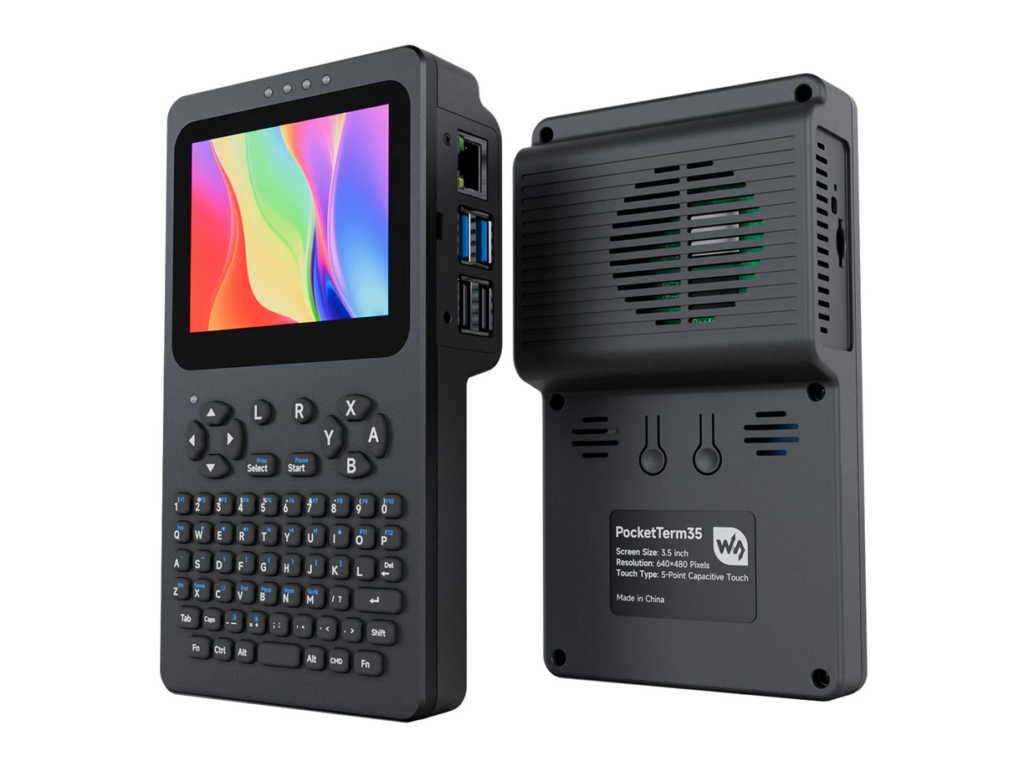
A cyberdeck is a customized or specialized portable computing device, typically inspired by the fictional computers featured in cyberpunk books, films, and video games.
The term became popular through science fiction, particularly William Gibson’s 1984 novel Neuromancer. In cyberpunk fiction, cyberdecks are powerful tools used to access computer networks and interact with digital environments.
Real-world cyberdecks take inspiration from this concept but serve more practical purposes. They can be built around small single-board computers, compact x86 computers, development boards, or repurposed laptop hardware.
A typical cyberdeck may include:
- A computing unit: A Raspberry Pi, another single-board computer, or a compact mini PC.
- A display: A small LCD screen, touchscreen, or portable monitor.
- A keyboard: A compact mechanical keyboard, an integrated keyboard, or a custom input system.
- A power source: A battery pack, rechargeable battery system, or external power supply.
- A custom enclosure: A 3D-printed shell, rugged case, modified electronics enclosure, or repurposed hardware housing.
- Connectivity: USB ports, Wi-Fi, Bluetooth, Ethernet, or other interfaces depending on the hardware.
- Optional accessories: Storage devices, sensors, microcontrollers, radios, or additional displays.
Not every cyberdeck includes all these components. Some are little more than a compact computer and keyboard inside a custom enclosure, while others are elaborate portable workstations designed for specific tasks.
The defining characteristic is customization rather than a particular set of specifications. There is no single official cyberdeck design, operating system, or hardware standard.
What Is a Cyberdeck Used For?
Cyberdecks can perform many of the same tasks as conventional computers, but their usefulness depends on the hardware and software installed.
1. Programming and Software Development
A cyberdeck can be a portable coding environment for developers who want to write, test, and run software away from their main workstation.
Depending on its specifications, it can run code editors, command-line tools, programming languages, and development environments.
Lightweight Linux-based cyberdecks are particularly suitable for Python scripting, shell scripting, electronics programming, and small development projects.
However, demanding applications such as large software builds, advanced virtual machines, and resource-intensive development tools may require a more powerful system.
2. Cybersecurity Learning and Ethical Hacking
Cyberdecks appeal to cybersecurity students and enthusiasts because they can provide a portable environment for learning networking, Linux administration, scripting, and security analysis.
With suitable hardware and software, a cyberdeck can be used for:
- Practicing Linux command-line operations.
- Studying network protocols.
- Analyzing network traffic on authorized networks.
- Running security assessment tools in a controlled lab.
- Learning scripting and automation.
- Connecting to remote lab machines and servers.
A cyberdeck is not automatically a powerful penetration-testing device. Its capabilities depend on its processor, memory, network interfaces, and compatible peripherals.
Some wireless security tasks also require specialized adapters that support the necessary features.
Cybersecurity activities should always be performed on systems and networks you own or have explicit permission to test.
3. Electronics and Hardware Projects
Cyberdecks can serve as portable control systems for electronics projects.
A device built around a Raspberry Pi or compatible development board can interface with microcontrollers, sensors, USB peripherals, and other electronic components.
Possible projects include monitoring environmental sensors, controlling robotics experiments, collecting data, and managing connected devices.
This makes cyberdecks attractive to makers, electronics enthusiasts, and students studying embedded systems.
4. Offline Computing and Fieldwork
Some cyberdecks are designed to work without a constant internet connection.
They can store documentation, technical manuals, programming references, maps, notes, and other resources locally.
This can be useful for field technicians, researchers, outdoor enthusiasts, and people working in locations with unreliable connectivity.
However, offline capability is not unique to cyberdecks. A conventional laptop or tablet can provide the same benefit if configured with the appropriate applications and files.
5. Writing, Research, and Personal Productivity
A cyberdeck with a comfortable keyboard and readable display can function as a portable writing or research machine.
Users can write documents, maintain notes, organize files, and use local applications without relying on cloud services.
Some people build minimalist cyberdecks specifically to reduce distractions and create a dedicated workspace.
The main consideration is ergonomics. A compact screen and unconventional keyboard layout may be less comfortable for extended work than a full-size laptop.
6. Gaming and Retro Computing
Cyberdecks can also be used for retro gaming, emulation, and lightweight games.
The available performance depends on the selected processor, graphics hardware, operating system, and cooling system.
Low-power single-board computers are suitable for many older gaming systems, while modern PC games generally require more capable hardware.
For gaming, a conventional handheld console or gaming laptop may offer better performance and compatibility for the money.
7. Creative Projects and Personal Expression
For some owners, a cyberdeck is more than a computer. It is a personal hardware project that combines engineering, design, programming, and experimentation.
Builders can customize the enclosure, keyboard, screen arrangement, lighting, connectivity, and internal components.
This freedom makes cyberdecks appealing to people who enjoy creating tools that reflect their own preferences rather than buying a standardized product.
Who Needs a Cyberdeck?
Cyberdecks are not necessary for most computer users. Their value comes from specific requirements, personal interests, or the enjoyment of building customized technology.
The following groups are most likely to benefit.
Cybersecurity Students and Enthusiasts
A cyberdeck can provide a portable Linux environment for practicing networking, scripting, and security analysis.
It is particularly useful for learners who want a dedicated device for authorized lab exercises without changing the configuration of their everyday computer.
Nevertheless, a standard laptop is often a better first purchase because it offers more performance, compatibility, and convenience for a similar budget.
Developers and Programmers
Developers who work with lightweight applications, command-line tools, and embedded systems may appreciate a compact, customized computing environment.
A cyberdeck is less compelling for professionals who need powerful processors, substantial memory, multiple large displays, or extensive compatibility with commercial software.
Makers, Tinkerers, and DIY Enthusiasts
This is one of the strongest audiences for cyberdecks.
If you enjoy soldering, 3D printing, modifying hardware, writing code, and experimenting with electronics, building a cyberdeck can be a rewarding project.
You can choose components based on your needs and improve the device over time.
Field Researchers and Technicians
People who collect data, troubleshoot equipment, or consult technical documentation in the field may benefit from a rugged, portable computer configured for specific tasks.
A well-designed cyberdeck can integrate the ports, controls, storage, and accessories needed for a particular workflow.
However, users who depend on their equipment professionally should prioritize reliability, battery safety, environmental protection, and maintainability over appearance.
Cyberpunk Fans and Technology Collectors
Some people build or purchase cyberdecks because they enjoy cyberpunk aesthetics and unconventional technology.
There is nothing wrong with choosing a device for its design or the satisfaction of owning a unique machine. The important point is to distinguish hobby value from practical computing value.
Who Probably Does Not Need a Cyberdeck?
A cyberdeck may be unnecessary if you primarily want to browse the web, attend video meetings, use office software, stream entertainment, or complete everyday school assignments.
A conventional laptop will usually provide a better combination of performance, battery life, screen quality, keyboard comfort, warranty support, and ease of use.
Similarly, a cyberdeck may not be the right choice for users who want a ready-to-use device without assembling components, configuring software, or troubleshooting hardware.
How Much Does a Cyberdeck Cost?
Cyberdeck prices vary significantly because there is no standardized product category. You might spend less than $100 on a basic DIY setup using components you already own, or several hundred dollars on a more capable custom build.
Professional-looking custom systems can cost substantially more, especially when they use premium displays, mechanical keyboards, powerful computing hardware, custom enclosures, or specialized accessories.
The following figures are approximate budgeting estimates in US dollars, not verified prices for specific products.
| Cyberdeck type | Estimated price (USD) | What to expect |
|---|---|---|
| Basic DIY cyberdeck | $50–$150 | Entry-level computing hardware, a basic display, simple input devices, and a budget enclosure. |
| Raspberry Pi-based cyberdeck | $100–$300 | A single-board computer, display, keyboard, power accessories, and a basic custom case. |
| Midrange custom cyberdeck | $250–$600 | Better display and input options, improved storage, more robust construction, and additional connectivity. |
| High-performance cyberdeck | $500–$1,200+ | A compact x86 computer or mini PC, higher-quality components, and more capable hardware. |
| Premium custom or specialized build | $1,000–$2,000+ | Specialized hardware, advanced fabrication, premium components, or extensive customization. |
These categories overlap, and a custom build can fall outside these ranges. A particularly inexpensive build may also depend on reusing a keyboard, display, battery pack, or computer you already own.
What Determines the Price?
Several factors have the biggest impact on the total cost.
Computing hardware: A low-cost single-board computer is generally less expensive than a compact PC with a modern processor and greater memory capacity.
Display quality: Small basic displays are relatively inexpensive, while high-resolution panels, touchscreens, and specialized display modules can add considerably to the budget.
Keyboard and input devices: A simple USB keyboard is inexpensive. Compact mechanical keyboards, custom key layouts, and integrated input systems can cost much more.
Battery and power management: A suitable battery system, charging electronics, voltage regulation, and protective circuitry add cost and complexity.
Enclosure and fabrication: Reusing a plastic case can keep costs low. Custom 3D printing, CNC machining, metalwork, and professional finishing can increase the price substantially.
Connectivity and accessories: Extra storage, USB hubs, network adapters, microcontrollers, antennas, and other peripherals can quickly increase the total.
Software and assembly: Many cyberdecks use free and open-source software, but some commercial applications or specialized components may require additional spending. Professional fabrication and assembly can also increase the price.
Is It Cheaper to Build or Buy a Cyberdeck?
Building your own cyberdeck can be cheaper if you already own some of the necessary components and are comfortable assembling and configuring the system.
For example, reusing an old mini PC, USB keyboard, and portable display can reduce the initial cost considerably.
However, a DIY project is not always the least expensive option. Buying new components individually, replacing failed parts, purchasing tools, and spending time troubleshooting can make the finished system more expensive than expected.
Prebuilt or professionally assembled cyberdecks may cost more upfront, but they can save time and offer a more polished design.
Buying advice: Before building or purchasing a cyberdeck, compare its total cost with that of a conventional laptop or mini PC. If you only need a portable computer, a standard laptop will often offer better value.
Advantages of Using a Cyberdeck
Cyberdecks offer several benefits, particularly for people who value customization, portability, and hands-on hardware experimentation.
1. Extensive Customization
One of the biggest advantages is the ability to tailor the device to a particular purpose.
You can select the processor, display, keyboard, storage, connectivity, operating system, and enclosure based on your requirements.
A cyberdeck designed for programming can look very different from one intended for field data collection or electronics testing.
This flexibility is difficult to match with many mass-market devices.
2. Greater Hardware Control
Building a cyberdeck gives you a better understanding of how its components work together.
Depending on the design, you may be able to replace the storage, upgrade the memory, change peripherals, or modify the enclosure.
This can make experimentation easier and extend the useful life of a well-designed device.
However, repairability depends on the specific hardware. Some cyberdecks use components that are soldered in place or difficult to replace.
3. Portable Computing for Specialized Tasks
A cyberdeck can combine the hardware and software required for a particular workflow into a single portable package.
For example, an electronics enthusiast could integrate a compact computer, display, keyboard, and interfaces needed to control development boards.
A field technician could configure a system to run offline documentation and diagnostic tools.
This integration can be more convenient than carrying several unrelated devices, provided the cyberdeck is designed well.
4. Opportunities to Learn New Skills
Building a cyberdeck can teach practical skills in:
- Linux installation and system administration.
- Hardware compatibility and troubleshooting.
- Basic electronics and power management.
- Programming and scripting.
- 3D printing and enclosure design.
- Network configuration.
- Data storage and backup planning.
These skills can be useful beyond the project itself.
5. Potential for Offline Privacy
A cyberdeck can be configured to store information locally and perform tasks without continuously connecting to cloud services.
This may appeal to users who prefer local file storage or want to minimize unnecessary online activity.
However, a cyberdeck is not automatically more private or secure than a regular laptop. Privacy depends on the operating system, installed applications, network settings, encryption, and user behavior.
6. Unique Design and Personal Ownership
A custom cyberdeck can be built around your preferred aesthetic, whether that means a minimalist enclosure, a rugged field-computer design, or a retro-futuristic appearance.
For hobbyists, the process of designing, building, and improving the device may be as valuable as the finished computer.
Disadvantages of Using a Cyberdeck
Despite their appeal, cyberdecks involve trade-offs that prospective owners should understand.
1. Limited Performance in Budget Builds
Many inexpensive cyberdecks use low-power single-board computers.
These are capable machines for numerous tasks, but they may struggle with demanding software, complex multitasking, large development environments, or modern games.
Performance depends on the actual components, not the cyberdeck label.
2. DIY Projects Require Technical Knowledge
Building a cyberdeck may involve installing an operating system, configuring drivers, wiring components, troubleshooting power issues, and designing an enclosure.
Beginners can learn these skills, but the process may require considerable time and patience.
Prebuilt systems can reduce the assembly burden, although custom designs may still require software configuration.
3. Battery Life Can Be Unpredictable
A cyberdeck’s battery life depends on its computing hardware, display, peripherals, power-management system, and battery capacity.
A power-hungry mini PC paired with a large display may consume substantially more energy than a low-power single-board computer.
Custom battery systems also require careful design. Incorrect battery selection, charging circuitry, or wiring can create fire and injury risks.
Use suitable protected battery packs and compatible charging hardware rather than improvising an unsafe power system.
4. Ergonomics May Be Poor
Compact keyboards, small displays, unusual viewing angles, and crowded enclosures can make a cyberdeck uncomfortable to use for extended periods.
A device that looks impressive may not be practical for several hours of writing or programming.
Before choosing a design, consider keyboard comfort, screen readability, viewing angle, and access to commonly used controls.
5. Custom Enclosures Can Be Difficult to Maintain
A tightly integrated design can make it harder to replace components or diagnose problems.
Poor ventilation may also cause overheating, particularly when powerful hardware is installed in a small case.
A good cyberdeck design should provide adequate airflow, secure cable connections, access to replaceable parts, and enough internal space for safe power management.
6. Compatibility and Support Can Be Limited
Custom cyberdecks may use unusual combinations of displays, keyboards, controllers, and operating systems.
Not every component works equally well with every computer, and some accessories may require additional configuration.
Unlike mainstream laptops, custom builds may have no single manufacturer responsible for troubleshooting the entire system.
7. They May Offer Poor Value for Money
A cyberdeck can become expensive once you include every component and accessory.
For the same budget, a conventional laptop may offer a better processor, a larger screen, longer battery life, a comfortable keyboard, a warranty, and fewer compatibility problems.
The additional cost of a cyberdeck makes the most sense when its custom design provides a real benefit or when building the device is part of the hobby.
Cyberdeck vs. Laptop: Which Is Better?
Cyberdecks and laptops serve overlapping purposes, but they are designed around different priorities.
| Feature | Cyberdeck | Conventional laptop |
|---|---|---|
| Customization | Often extensive, particularly for DIY builds | Usually limited to supported upgrades and settings |
| Portability | Depends heavily on the design | Generally optimized for portability |
| Performance | Varies from basic to high-performance | Broad range of performance options |
| Battery life | Highly dependent on the build | Usually specified and tested by the manufacturer |
| Repairability | Can be excellent or poor, depending on construction | Varies by model |
| Ease of use | May require assembly and configuration | Generally ready to use |
| Software compatibility | Depends on hardware and operating system | Usually better documented for mainstream applications |
| Cost | Can be inexpensive or very expensive | Wide range of budget and premium options |
| Unique appearance | Often a major design feature | Usually follows conventional designs |
| Warranty and support | May be limited for custom builds | Typically available from the manufacturer |
Which Should You Choose?
Choose a cyberdeck if you enjoy hardware projects, need a specialized portable workstation, want extensive control over the design, or value the experience of building your own computer.
Choose a conventional laptop if you want a reliable everyday computer for work, school, travel, entertainment, or general productivity.
A third option is to build a portable workstation around an existing mini PC or single-board computer without committing to an elaborate custom enclosure. This can provide many of the practical benefits of a cyberdeck while keeping costs and complexity under control.
What to Look for Before Buying or Building a Cyberdeck
If you have decided that a cyberdeck suits your needs, consider the following factors before spending money.
1. Define Your Main Purpose
Start by identifying the tasks you expect the device to perform.
A system for writing and scripting does not need the same hardware as one intended for advanced development, data analysis, or demanding graphical applications.
Choosing components around a clear use case can prevent unnecessary spending.
2. Choose the Right Computing Platform
Single-board computers are attractive for low-power, compact builds and electronics projects.
Compact x86 systems are generally more suitable when you need broader desktop software compatibility or greater processing performance.
Check memory, storage, supported operating systems, available ports, and cooling requirements before choosing a platform.
3. Prioritize the Display and Keyboard
A good display and comfortable keyboard can make a greater difference to everyday usability than decorative features.
Consider resolution, brightness, viewing angle, keyboard layout, and whether the device will be used indoors or outdoors.
If possible, test the input devices before committing to a custom enclosure.
4. Plan the Power System Carefully
Estimate how much power the computer, display, and peripherals will consume.
Choose a suitable battery capacity and compatible power-management components. Follow the battery manufacturer’s safety requirements and ensure the design provides appropriate protection against overcharging, overcurrent, and short circuits.
If you are inexperienced with battery electronics, use a reputable, ready-made power solution rather than designing an improvised battery pack.
5. Check Connectivity
Consider whether you need USB-A, USB-C, Ethernet, HDMI, Wi-Fi, Bluetooth, removable storage, or connections for external electronics.
Specialized wireless features may require compatible adapters, so check operating-system and driver support before purchasing them.
6. Think About Heat and Durability
Small enclosures can trap heat, especially when they contain powerful processors or multiple electronic components.
Ensure that the enclosure provides sufficient ventilation and that components remain within their rated operating temperatures.
If the device will be used in the field, consider dust protection, impact resistance, secure connectors, and protection from moisture.
7. Calculate the Complete Cost
Include the computer, display, keyboard, enclosure, battery, storage, cables, accessories, and any tools you need.
For a DIY build, also account for replacement parts and the possibility that the first design may need modifications.
Compare the resulting cost against a laptop with similar performance before making a final decision.
Are Cyberdecks Worth It?
Cyberdecks are worth considering when customization, experimentation, or specialized functionality matters more to you than convenience alone.
For makers, electronics enthusiasts, cybersecurity learners, and people who enjoy building their own hardware, a cyberdeck can be both a useful tool and a rewarding project.
For general computing, however, the benefits are less obvious. A conventional laptop will usually provide better out-of-the-box usability, and a dedicated handheld or specialized device may be more suitable for certain tasks.
The smartest approach is to begin with your requirements rather than the appearance of the device. Decide what you need to accomplish, establish a realistic budget, and select hardware that supports those goals.
SEE2GET verdict: A cyberdeck is best viewed as a customizable computing platform rather than a direct replacement for every laptop. If you value control, creativity, and hands-on learning, it can be an excellent investment. If you simply need a portable computer, compare mainstream alternatives before committing to a custom build.
Frequently Asked Questions About Cyberdecks
1. What exactly is a cyberdeck?
A cyberdeck is a customized or specialized portable computer inspired by cyberpunk science fiction. It typically combines computing hardware, a display, input devices, and a custom or unconventional enclosure. It can be used for programming, electronics projects, cybersecurity learning, offline work, and other computing tasks.
2. How much does a cyberdeck cost?
A basic DIY cyberdeck may cost approximately $50–$150 if you can reuse some components. A more complete build may cost $100–$300, while advanced custom systems can cost $500–$1,200 or more. Premium builds can exceed $2,000. Actual prices depend on the hardware, accessories, fabrication, and availability.
3. Are cyberdecks real computers or just fictional devices?
Real-world cyberdecks are actual computers. The term originated in cyberpunk fiction, but hobbyists and hardware enthusiasts now use it to describe customized portable computing systems. Real devices have practical hardware limitations and do not possess the fictional capabilities sometimes portrayed in movies or novels.
4. Who should buy a cyberdeck?
Cyberdecks are most suitable for DIY enthusiasts, makers, programmers, cybersecurity students, electronics hobbyists, and people who need a specialized portable workstation. They can also appeal to cyberpunk fans who enjoy custom hardware.
5. Can a cyberdeck replace a laptop?
Sometimes, but not always. A powerful cyberdeck can handle many everyday computing tasks, but compact or budget models may have limited performance, battery life, and ergonomics. For most people who need a dependable general-purpose computer, a conventional laptop is the more practical option.
6. Can you build a cyberdeck yourself?
Yes. Many cyberdecks are DIY projects built from single-board computers or compact PCs, displays, keyboards, power systems, and custom enclosures. You can start with a simple design and add features over time. Basic computer configuration skills are helpful, while more advanced builds may require electronics knowledge and fabrication tools.
7. Is a Raspberry Pi suitable for a cyberdeck?
Yes. A Raspberry Pi can be a good choice for compact cyberdecks, programming, electronics projects, lightweight Linux applications, and offline computing. The best model depends on the required processing power, memory, connectivity, and available budget.
8. What operating system does a cyberdeck use?
Many cyberdecks run Linux distributions, including Raspberry Pi OS and other compatible Linux systems. Some use Windows, while others use specialized operating systems or minimal software environments. The choice depends on the hardware and the applications you want to run.
9. Are cyberdecks good for cybersecurity?
They can be useful for learning Linux, networking, scripting, and security testing in authorized environments. However, a cyberdeck is not inherently more capable than a laptop with equivalent hardware. Specialized wireless testing may require compatible network adapters and drivers.
10. Can a cyberdeck work without the internet?
Yes. A cyberdeck can run offline applications and access locally stored documents, tools, and data. You can prepare it with the resources you need before going offline. Some functions, including cloud services and online updates, will still require an internet connection.
11. How long does a cyberdeck battery last?
Battery life varies according to the battery capacity, computing hardware, display, and connected peripherals. A low-power build may operate for several hours, while a power-hungry system may run for much less time. Actual runtime should be measured for the finished build rather than assumed from battery capacity alone.
12. Are cyberdecks secure?
Cyberdecks can be configured securely, but their security depends on the operating system, software updates, encryption, account permissions, and network configuration. Custom hardware does not automatically provide stronger protection than a conventional computer.
13. Are cyberdecks good for gaming?
Some cyberdecks can handle retro games and lightweight titles. More demanding games require stronger processors and graphics hardware. If gaming is your primary goal, compare the cost and performance of a cyberdeck with a gaming laptop or handheld gaming device.
14. Is building a cyberdeck cheaper than buying one?
It can be, particularly if you already own components or use affordable hardware. However, buying everything new, paying for fabrication, and replacing incompatible parts can increase the total cost. Compare the complete build price with a conventional laptop before deciding.
15. What is the difference between a cyberdeck and a mini PC?
A mini PC is a compact computer designed primarily to provide computing performance in a small form factor. A cyberdeck is generally a customized computing setup that may integrate a mini PC or another computer with a display, keyboard, power source, and specialized enclosure. A mini PC can therefore serve as the computing core of a cyberdeck.
16. Do cyberdecks require programming skills?
No. You can use a cyberdeck for basic computing without being a programmer. However, building a custom device, configuring its software, and developing specialized features may require programming or command-line knowledge.
17. Are cyberdecks worth buying in 2026?
They can be worthwhile for hobbyists and users who need a customizable, specialized computing device. However, the best value depends on the hardware, the intended tasks, and the cost compared with conventional computers. Before buying, verify current component prices and compare the complete system with similarly priced laptops and mini PCs.
18. What is the best cyberdeck for beginners?
There is no single best model for everyone. Beginners who enjoy DIY projects can start with an affordable single-board computer, a compatible display, a USB keyboard, and a simple enclosure. Those who prefer a ready-to-use device may find a conventional laptop or mini PC easier to manage.
Final Thoughts
Cyberdecks combine computing, customization, and creative hardware design in a way that appeals to people who want more control over their technology.
They can be useful for programming, cybersecurity education, electronics experimentation, offline work, and specialized field applications. They also offer an opportunity to develop practical skills in computer hardware, Linux, and electronics.
Their main disadvantages are the potential cost, limited performance in budget builds, uneven ergonomics, and the time required to assemble and maintain a custom system.
For SEE2GET readers, the buying decision comes down to one question: Do you need a customizable computer for a specific purpose, or do you simply need a computer?
If you want a hands-on project and a device tailored to your workflow, a cyberdeck may be an excellent choice. If you prioritize convenience, performance per dollar, and dependable everyday use, a conventional laptop is likely to be the smarter purchase.